

Jenkins has been a leading force in the CI/CD landscape for over a decade, powering continuous integration and deployment for millions of developers worldwide.
With its vast ecosystem of over 2,000 plugins and complete flexibility through scripting, it has become a go-to automation server for teams who want to build their CI/CD pipeline to their exact specifications. But as enterprises modernize their technology stacks, particularly those with mainframe systems, the question arises: is assembling your own CI/CD solution from plugins and scripts still the best approach?
To create this Jenkins review, I've analyzed the platform extensively.
While Jenkins excels at providing extensive customization through its plugin architecture, it requires significant expertise and maintenance to operate effectively. For enterprises seeking a fundamentally different approach, particularly those modernizing mainframe systems, there's Kobee: an out-of-the-box enterprise CI/CD platform that delivers complete functionality from day one without the complexity of managing plugins and scripts.
Where Jenkins asks you to build your CI/CD pipeline piece by piece, Kobee provides a ready-made solution designed specifically for large, regulated enterprises with complex hybrid environments. Instead of Groovy scripts and plugin dependencies, it uses a Phases architecture with modular, parameter-driven containers that make enterprise CI/CD accessible without deep DevOps expertise.
If you're ready to explore enterprise CI/CD without the plugin complexity, you can learn more about Kobee here.
Table of contents:
- What is Jenkins?
- Jenkins Pros & Cons
- Jenkins Review: How it Works & Key Features
- Where Jenkins Falls Short
- A Different Approach to Enterprise CI/CD: Kobee
- Jenkins and Kobee: Comparison Summary
- Final Verdict
What is Jenkins?
Jenkins is an open-source automation server written in Java that has become the foundation for CI/CD pipelines across the software industry. Originally created as "Hudson" in 2004 by Kohsuke Kawaguchi at Sun Microsystems, it emerged from a simple need: Kawaguchi wanted to know if his code would break the build before committing it. The tool was renamed Jenkins in 2011 following a dispute with Oracle over the Hudson trademark.

Today, Jenkins serves over 200,000 active installations with more than 1 million users globally. Its core philosophy centers on extensibility through plugins, allowing teams to integrate with most tools in their development workflow. The platform operates on a master-agent architecture, where a central controller orchestrates build jobs across distributed agents.

Jenkins has evolved from a simple continuous integration server to a comprehensive automation platform. With Jenkins 2.0's introduction of Pipeline as Code, teams can define their entire delivery pipeline in version-controlled Jenkinsfiles using a Groovy-based DSL. This positions Jenkins as an ideal solution for DevOps teams with the technical expertise to craft custom automation workflows and the resources to maintain them.
Jenkins Pros & Cons
| Pros | Cons |
|---|---|
| ✅ Free and open-source with no licensing costs | ❌ Steep learning curve requiring DevOps expertise |
| ✅ Over 2,000 plugins for extensive customization | ❌ Complex plugin management and dependencies |
| ✅ Platform independent (runs on Linux, Windows, macOS) | ❌ Significant maintenance overhead |
| ✅ Large, active community with extensive documentation | ❌ Configuration-heavy with Groovy scripting requirements |
| ✅ Extensive control over CI/CD pipeline design | ❌ Limited native support for mainframe systems |
Jenkins Review: How it Works & Key Features
Pipeline as Code
Jenkins significantly advanced CI/CD with its Pipeline as Code concept, where the entire delivery pipeline is defined in a text file called a Jenkinsfile. This file, written in a Groovy-based domain-specific language, becomes part of your source code repository, enabling version control, code reviews, and pipeline evolution alongside your application code.
Jenkins offers two pipeline syntaxes.
- Declarative Pipeline provides a more structured approach with predefined sections like pipeline, agent, stages, and steps.
- Scripted Pipeline offers maximum flexibility through direct Groovy scripting.
A typical Jenkinsfile defines stages such as Build, Test, and Deploy, with each stage containing specific steps like compiling code, running tests, or pushing artifacts.
The pipeline execution follows your defined workflow, with Jenkins automatically handling job scheduling, workspace management, and result reporting. Visual representations in Blue Ocean or the classic Pipeline Stage View show progress through each stage, making it easy to identify bottlenecks or failures.

The Plugin Ecosystem
The plugin ecosystem forms the heart of Jenkins' flexibility.
With over 2,000 community-contributed plugins, Jenkins can integrate with most common tools in your development stack. Plugins provide everything from basic functionality to complex integrations. Source control plugins support Git, Subversion, Mercurial, and Perforce. Build tool plugins enable Maven, Gradle, Ant, and npm workflows. Cloud plugins provision agents in AWS, Azure, or Google Cloud dynamically.
Installing plugins happens through the Plugin Manager in the Jenkins UI.
Dependencies are handled automatically, though this can lead to what users call "plugin hell" when managing dozens of plugins with interconnected dependencies. Each plugin adds new functionality to Jenkins, from simple build steps to complete workflow transformations.

The community-driven nature means there's likely a plugin for most common tools you use. Need to integrate with Jira? There's a plugin. Want to send notifications to Slack? There's a plugin. Need to deploy to Kubernetes? Multiple plugins exist for that.
Distributed Builds Architecture
Jenkins scales through its master-agent architecture, now referred to as controller-agent to use more inclusive terminology. The controller manages the Jenkins installation, schedules jobs, and serves the web interface. Agents handle the actual build execution, allowing you to distribute workload across multiple machines.

Agents can be permanent machines in your data center, dynamically provisioned cloud instances, or Docker containers. Each agent can have labels indicating its capabilities, such as "linux," "docker," or "nodejs." Jobs specify which labels they require, and Jenkins automatically dispatches work to appropriate agents.
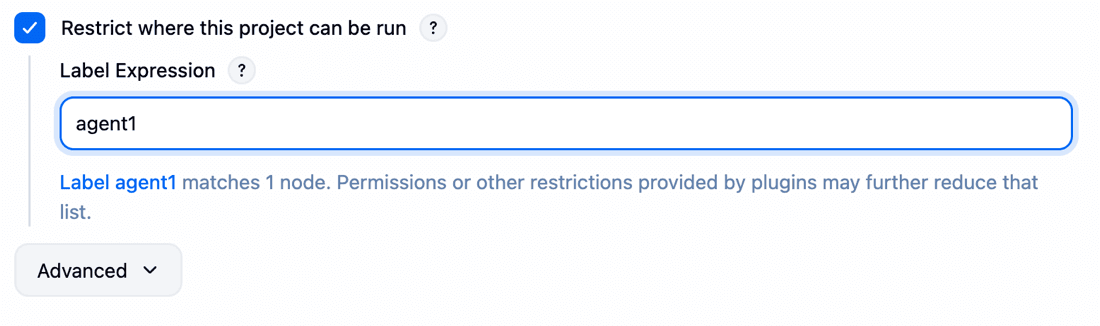
This architecture enables several powerful patterns. You can run builds on different operating systems by having Windows, Linux, and macOS agents. Resource-intensive builds get dedicated high-performance agents.
Cloud agents spin up on demand for burst capacity, then terminate to save costs. The Kubernetes plugin can even create agent pods dynamically, providing elastic scalability for containerized workloads.
Where Jenkins Falls Short
While Jenkins' plugin-based flexibility is its greatest strength, several limitations reveal a platform optimized for extensive customization rather than immediate productivity. These constraints reflect deliberate architectural choices that may not align with every organization's needs.
The most significant challenge is the complexity of plugin management.
While Jenkins offers flexibility through its extensive plugin ecosystem, this comes with the responsibility of maintaining dozens or hundreds of plugins, managing their interdependencies, and dealing with compatibility issues when updating Jenkins or individual plugins. This "plugin hell" requires dedicated resources and expertise to navigate successfully.

The scripting requirements present another barrier.
While Pipeline as Code provides powerful automation capabilities, writing and debugging Jenkinsfiles requires Groovy knowledge. Complex pipelines can become difficult to maintain, and the learning curve for team members without scripting experience can be substantial. Even with declarative syntax, teams often need to fall back to scripted pipelines for advanced use cases.
For enterprises with mainframe systems, Jenkins' limitations become particularly apparent.
While plugins exist for some mainframe tools, they often lack the deep integration and native understanding of mainframe workflows that these critical systems require. Organizations find themselves writing custom scripts and workarounds to bridge the gap between Jenkins and their IBM z/OS environments.
The maintenance overhead of Jenkins can be significant.
Beyond plugin management, there's the ongoing work of maintaining the Jenkins controller, managing agents, handling security updates, and troubleshooting build failures. Many organizations experience "Jenkins sprawl," where different teams spin up their own Jenkins instances, leading to inconsistent practices and duplicated effort.

These limitations aren't failures but natural consequences of Jenkins' design philosophy: maximum flexibility through community-driven plugins. However, they highlight the need for alternatives, especially for enterprise CI/CD.
A Different Approach to Enterprise CI/CD: Kobee
Kobee represents a fundamentally different philosophy in CI/CD: instead of assembling your pipeline from plugins and scripts, you get an out-of-the-box enterprise CI/CD platform that's complete from day one.
Developed specifically for enterprise environments that require high customization, transparency, and standardization, Kobee eliminates the complexity of plugin management while delivering comprehensive CI/CD capabilities.

Complete Out-of-the-Box Functionality
Where Jenkins requires plugins for essential functionality, Kobee provides comprehensive features for enterprise CI/CD without extensive customization.
The platform includes native integrations with version control systems like Git, Subversion, and Microsoft TFVC, along with issue tracking systems including Jira, Azure DevOps, and GitHub. Build automation, deployment orchestration, approval workflows, and notifications all come standard.

This completeness extends to enterprise requirements often overlooked by plugin-based approaches. User access control integrates directly with Active Directory and LDAP. Audit trails and compliance features support standards like Sarbanes-Oxley, ITIL, and CMM. The platform runs on Linux, Unix, or Windows, providing true platform independence without additional configuration.
For organizations tired of managing plugin dependencies and compatibility issues, this integrated approach means faster implementation and lower maintenance overhead. Kobee's integrated architecture is designed to reduce the risk of compatibility issues that can arise from plugin updates.
The Phases Architecture
Instead of writing Groovy scripts or managing plugins, Kobee uses a unique Phases architecture. Phases are modular, parameter-driven containers that perform specific CI/CD actions. Unlike monolithic scripts that can become complex and difficult to maintain, Phases break down workflows into small, reusable building blocks that can be configured through a graphical interface.
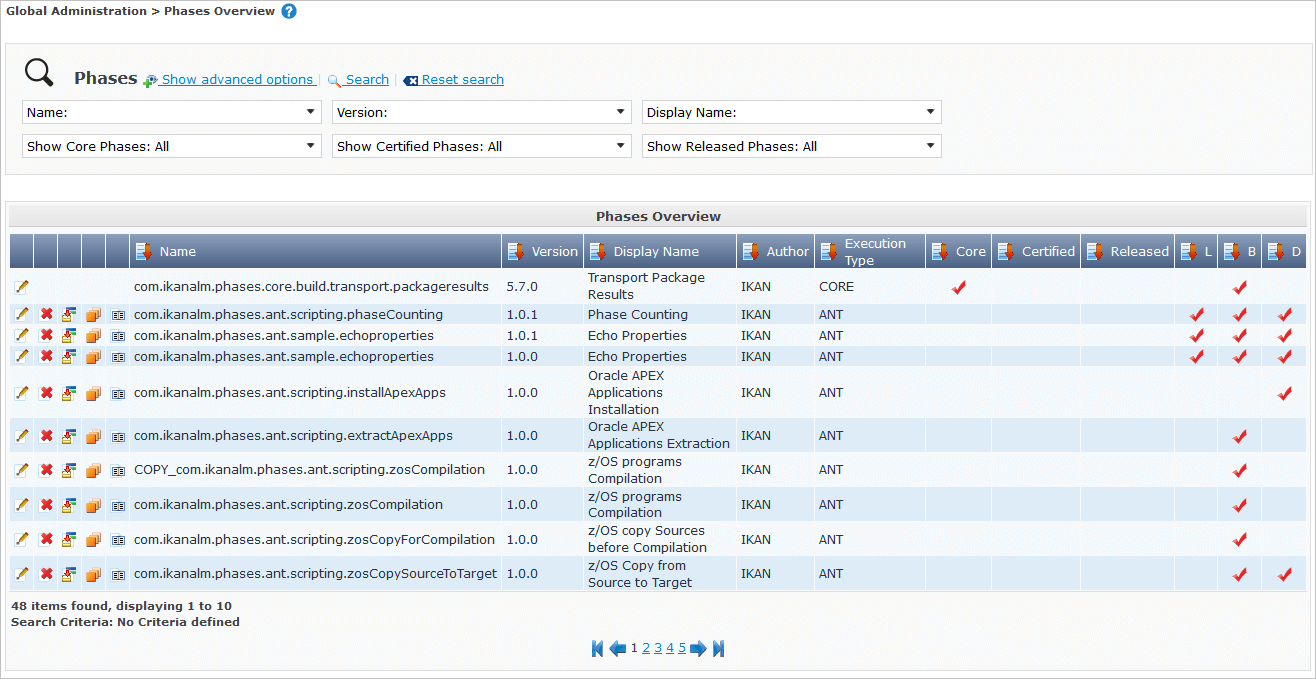
Three types of Phases power your workflows.
- Core Phases provide essential functionalities like code retrieval, compilation, and deployment.
- Solution Phases offer certified, pre-configured actions for specific platforms, particularly IBM z/OS mainframe and Oracle ODI.
- Custom Phases let you extend the platform for unique requirements using familiar tools like Ant, Maven, or Gradle, but critically, these custom Phases remain parameter-driven and GUI-configurable.
The key innovation is that Phases expose their parameters through Kobee's interface, allowing teams to modify CI/CD behavior without touching scripts.
A deployment Phase might have parameters for target servers, credentials, and file paths, all configurable through dropdowns and text fields rather than code editing. This democratizes CI/CD management, enabling team members without scripting expertise to maintain and modify pipelines.
Mainframe Excellence
Where Kobee truly distinguishes itself is in mainframe modernization. The platform provides native support for IBM z/OS environments, serving as a drop-in replacement for legacy SCM tools like ChangeMan and Panvalet. This isn't an afterthought or plugin; it's core functionality designed from the ground up.
With Kobee, developers can use Git for version control, modern IDEs including VS Code, IDZ, and Eclipse-based editors, and modern CI/CD practices, all while working with mainframe code. The platform handles the complexity of mainframe languages and technologies, providing specialized Solution Phases for mainframe-specific tasks.
With optional support for IBM tools like DBB and Wazi Deploy, it seamlessly integrates with existing mainframe toolchains.

Organizations report saving over two-thirds on software maintenance costs after replacing legacy SCM tools with Kobee. The platform's Excellence in Mainframe Innovation award at the 2024 IBM TechXchange Awards validates its effectiveness in this critical but often underserved market.


Kobee also comes with a separate application where you can set and customize every detail of your mainframe configuration using an easy-to-use GUI. Again, no scripting required! This makes mainframe CI/CD accessible to teams without deep mainframe expertise, crucial as experienced mainframe professionals retire.

Jenkins and Kobee: Comparison Summary
| Aspect | Jenkins | Kobee |
|---|---|---|
| Core Approach | Plugin-based assembly | Out-of-the-box completeness |
| Target Audience | DevOps teams, developers | Mainframe shops, large and regulated enterprises |
| Customization Method | Groovy scripts and plugins | Phases with GUI parameters |
| Mainframe Support | Limited via plugins | Native, built-in functionality |
| Learning Curve | Steep, requires expertise | Intuitive |
| Maintenance Overhead | High (plugin management) | Reduced (integrated platform) |
| (Starting) Price | Free (plus infrastructure costs) | Enterprise license €99.95/user/month (min. €25,000/year) |
| Best For | Maximum flexibility and customization | Enterprise standardization and mainframe modernization |
Final Verdict
The choice between Jenkins and Kobee represents a fundamental decision about how you want to approach CI/CD in your organization.
Jenkins remains an excellent choice for teams that value complete control and extensive customization possibilities.
If you have dedicated DevOps resources, enjoy crafting custom solutions, and need to integrate with cutting-edge tools as soon as they emerge, Jenkins provides the flexibility to build exactly what you need. Its open-source nature and massive plugin ecosystem ensure you're never locked into a specific way of working.
And just like Jenkins allows you to write custom plugins, Kobee lets you create custom Phases when your specific needs aren't covered by the standard catalog.
Kobee serves organizations that need enterprise CI/CD to work reliably from day one, particularly those with mainframe systems or operating in regulated industries.
If you want to focus on delivering software rather than maintaining CI/CD infrastructure, need to modernize mainframe development practices, or require built-in compliance and governance features, Kobee's out-of-the-box completeness eliminates much of the complexity that comes with plugin-based approaches.
Both platforms excel in their chosen philosophy.
Jenkins empowers you to build a highly customized CI/CD pipeline if you have the expertise and resources. Kobee delivers enterprise CI/CD that works out of the box, with special excellence in mainframe environments.
So, your choice depends on whether you want to build your solution or have it ready-made.
Still patching Jenkins with plugins and scripts?
Constant plugin updates and compliance gaps drain resources. Kobee provides stable, enterprise CI/CD without the firefighting.
About the author
Hello, my name is René De Vleeschauwer.
Throughout my career, I have been actively engaged in developing enterprise software. For the past 18 years, I have led the development of Kobee, an open CI/CD and DevOps framework that has been highly regarded in regulated enterprises.
Do you have any questions? Just ask me!