

Choosing between GitHub and GitLab for your enterprise DevOps needs often comes down to these five critical questions:
- Do you need the industry's largest developer community and ecosystem, or a single application that handles your entire DevOps lifecycle?
- Is your priority leveraging AI-powered development tools, or having all features integrated without third-party dependencies?
- Are you looking for best-in-class individual tools you can mix and match, or an all-in-one platform with everything built in?
- Does your organization have mainframe systems that need modern CI/CD capabilities alongside distributed applications?
- Would you rather configure and maintain multiple tools and plugins, or have enterprise-grade functionality working out of the box?
In short, here's what we recommend:
GitHub
Github is the leading platform in developer collaboration and open source, with over 100 million developers and advanced AI capabilities through GitHub Copilot. Its massive ecosystem, deep Microsoft integration, and familiar interface make it the default choice for many organizations. However, achieving a complete DevOps workflow often requires integrating multiple tools and services, which can create complexity and increase costs for enterprises seeking an all-in-one solution.
GitLab
GitLab delivers on the promise of a single application for the entire DevOps lifecycle, from planning and source code management to CI/CD, security, and monitoring. This unified approach eliminates tool sprawl and provides seamless workflows without integration headaches. With its comprehensive platform, transparent pricing, and recently launched GitLab Duo AI features, GitLab offers a compelling alternative for organizations wanting everything in one place.
Both platforms now offer mainframe support options. But what if your enterprise needs purpose-built mainframe CI/CD with minimal configuration? That's where specialized solutions come in.
Kobee
Kobee is an out-of-the-box enterprise CI/CD platform specifically designed for organizations with complex mainframe and distributed environments. Its unique Phases architecture (modular, model and parameter-driven containers that perform specific CI/CD actions, unlike monolithic scripts) enables advanced automation without scripting expertise. For mainframe-heavy enterprises and large regulated organizations, Kobee offers mature mainframe DevOps practices configured through an intuitive GUI rather than complex scripts.
If your enterprise needs to modernize mainframe development with minimal configuration and maximum control, see how Kobee's purpose-built approach transforms legacy CI/CD.
Table of contents:
- GitHub vs GitLab vs Kobee at a glance
- The philosophical divide: Ecosystem vs platform vs enterprise-ready
- GitHub leads collaboration, GitLab unifies DevOps
- The mainframe modernization landscape
- Kobee's Phases architecture changes the CI/CD game
- Integration approaches reveal fundamental differences
- Security and compliance capabilities for regulated industries
- The real cost of "free" at enterprise scale
- Support models reflect target markets
- GitHub vs GitLab vs Kobee: Which should you choose?
GitHub vs GitLab vs Kobee at a glance
Here's how these three platforms fundamentally differ in their approach to enterprise DevOps:
| GitHub | GitLab | Kobee | |
|---|---|---|---|
| Core Philosophy | Best-of-breed ecosystem with AI innovation | All-in-one DevOps platform | Out-of-the-box enterprise CI/CD |
| (Starting) Price | Free: $0/user/month Team: $4/user/month |
Free: $0/user/month Premium: $29/user/month |
Enterprise: €99.95/user/month (min. €25,000/year) |
| Deployment Options | Cloud (SaaS), Server | Cloud (SaaS), Self-managed | On-premises, Cloud |
| CI/CD Approach | GitHub Actions (event-driven) | Built-in GitLab CI/CD | Phases-based automation |
| Learning Curve | ⭐⭐⭐⭐ Familiar interface |
⭐⭐⭐ Feature-rich complexity |
⭐⭐⭐⭐ Intuitive |
| Plugin Ecosystem | Extensive marketplace | Built-in features + integrations | Mainframe built-in functionality |
| Mainframe Support | Growing (IBM Z runners available) |
GitLab Ultimate for IBM Z | ⭐⭐⭐⭐⭐ Purpose-built, native support |
| Target Audience | All developers, enterprises | DevOps teams, enterprises | Mainframe shops, large and regulated enterprises |
| Support Model | Community to enterprise | Email to priority | Professional |
The philosophical divide: Ecosystem vs platform vs enterprise-ready
Understanding each platform's core philosophy reveals why feature comparisons often miss the point.
GitHub embraces the power of ecosystems and developer choice. Rather than trying to be everything to everyone, it provides excellent source control and collaboration, then relies on its massive marketplace and integrations to fill other needs.
As a result, GitHub has helped create the world's largest developer community, where innovation happens through millions of contributors and thousands of integrations. The addition of AI through GitHub Copilot demonstrates GitHub's commitment to pushing development boundaries.

GitLab takes the opposite approach, offering a “single application” to cover the entire DevOps lifecycle.
Every major DevOps feature (planning, source control, CI/CD, security, monitoring) is built and maintained by GitLab, ensuring consistency and reducing integration complexity. This opinionated approach trades some flexibility for the simplicity of having everything work together seamlessly. No authentication headaches between tools, fewer data silos, reduced integration maintenance.

Kobee represents a third strategy: enterprise-ready from day one.
Built specifically for complex enterprise environments, Kobee provides out-of-the-box support for mainframe languages and technologies, advanced workflow automation through its Phases architecture, and governance features that regulated industries require. It focuses on CI/CD and toolchain orchestration rather than trying to be a general-purpose platform.

GitHub leads collaboration, GitLab unifies DevOps
GitHub popularized the modern collaborative development experience. With over 100 million developers and 420 million repositories, it's not just a platform, it's the center of the software development universe.
GitHub's strengths are undeniable:
- Unmatched network effects: Developers are on GitHub because everyone else is
- GitHub Copilot: AI pair programming that can boost productivity by up to 55%
- Seamless pull request workflow: The gold standard for code review
- Actions marketplace: Over 10,000 pre-built automation components
- Microsoft backing: Deep integration with VS Code, Azure, and enterprise tools
But this ecosystem approach has trade-offs. Want comprehensive CI/CD? Add GitHub Actions. Need security scanning? Configure Advanced Security (additional cost). Project management? Issues and Projects are basic compared to dedicated tools. Each addition can increase complexity and cost.

GitLab's unified platform tells a different story:
- True single application: Everything from planning to monitoring in one interface
- Integrated CI/CD: Not an add-on but a core feature since 2015
- Security scanning capabilities: SAST, DAST, dependency scanning (availability varies by tier)
- Consistent experience: Same UI patterns, permissions, and workflows throughout
- DevSecOps by default: Security integrated into the development workflow
The downside? When most features are built-in, you're primarily working within what GitLab provides. While GitLab does support integrations with external tools, some teams find specific built-in features less powerful than best-of-breed alternatives. And that massive feature set can overwhelm teams that just need solid version control and CI/CD.

The mainframe modernization landscape
The mainframe DevOps landscape has evolved significantly. While mainframes power critical business logic for most Fortune 500 companies and large banks, modernizing their development practices has historically been challenging.
Recent developments have changed this landscape:
- GitHub now offers IBM Z runners, enabling GitHub Actions workflows for mainframe development
- GitLab launched GitLab Ultimate for IBM Z in 2024, providing native z/OS runner support for CI/CD pipelines
- Modern tools like IBM DBB, Wazi Deploy, and Git-based workflows are replacing legacy processes
However, implementing these solutions often requires significant configuration, scripting expertise, and integration work. This is where purpose-built solutions demonstrate their value.
Kobee was designed specifically for this challenge. With native support for mainframe languages and technologies like JCL, optional support for IBM tools like DBB and Wazi Deploy, and its unique Phases architecture, Kobee transforms mainframe development without requiring extensive DevOps expertise.
Developers can use Git for version control, modern IDEs (including IDZ or VS Code) for editing, and contemporary CI/CD practices, all while working with mainframe code.
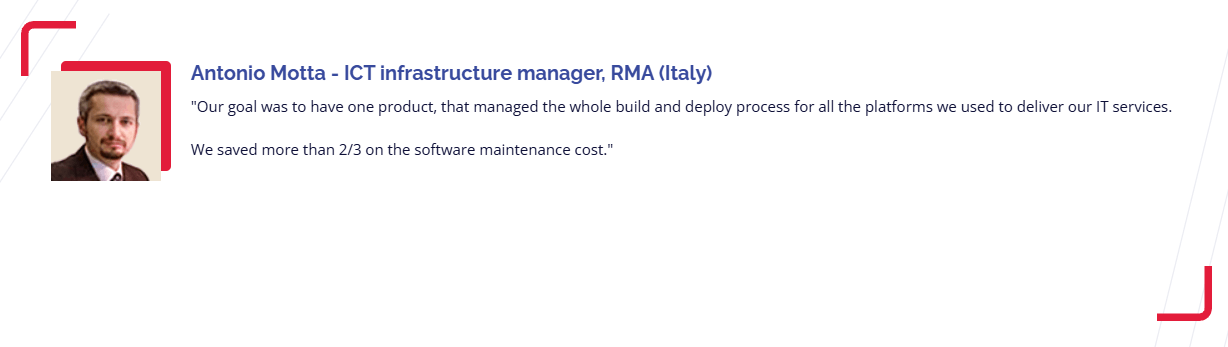
The impact can be significant. One Kobee customer reported reducing software maintenance costs by two-thirds after replacing their legacy SCM tools. That's not just incremental improvement, that's a fundamental shift in how mainframe development works.
Kobee's Phases architecture changes the CI/CD game
While GitHub relies on Actions and GitLab uses CI/CD pipelines, Kobee's Phases architecture represents a different approach to automation designed specifically for enterprise needs.
Phases are modular, parameter-driven containers that perform specific CI/CD actions (unlike monolithic scripts that require extensive coding knowledge). Think of them as intelligent building blocks for your CI/CD process:
- Modular: Small, focused units that do one thing well
- Model driven: predefined, customizable templates (like for JCL cards)
- Parameter-driven: Configure behavior through the GUI, not by editing scripts
- Reusable: Use the same Phase across multiple projects and pipelines
- Intelligent: Built-in error handling and logging for easier debugging
This architecture addresses a critical enterprise challenge: how do you give teams powerful automation capabilities without requiring deep DevOps expertise?
With Kobee, a mainframe developer who's never written a CI/CD pipeline can create workflows by assembling pre-built Phases. Need to compile mainframe code, run tests, and deploy to production? There are Phases for that. Want to integrate with Jira or trigger notifications? More Phases.

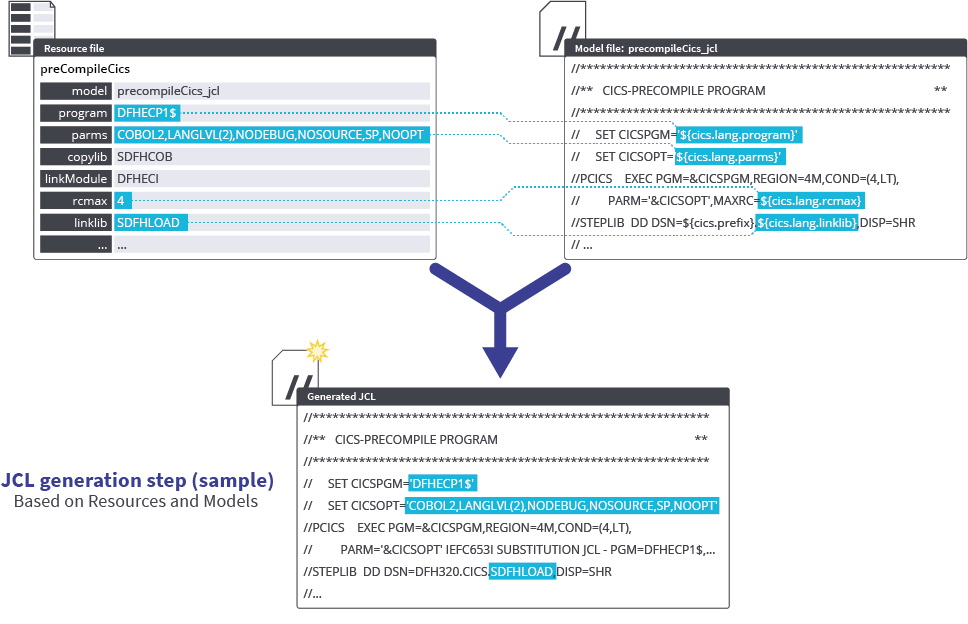

Similar to how Jenkins allows custom plugins, Kobee lets you create custom Phases when your specific needs aren't covered by the standard catalog. The difference is that Kobee's Phases are designed to be parameter-driven from the start, making them more maintainable and reusable.
Kobee also includes a separate configuration application (Kobee Resource Configurator) where you can set and customize every detail of your mainframe configuration using an easy-to-use GUI. Again, no scripting required!

Integration approaches reveal fundamental differences
How each platform handles integrations tells you everything about their philosophy and target market.
GitHub's approach is "integrate with everything." The marketplace offers thousands of apps and actions, from security scanners to project management tools. This flexibility is powerful but comes with considerations:
- Each integration needs configuration and maintenance
- Authentication and permissions multiply across tools
- Data synchronization becomes your responsibility
- Troubleshooting requires understanding multiple systems
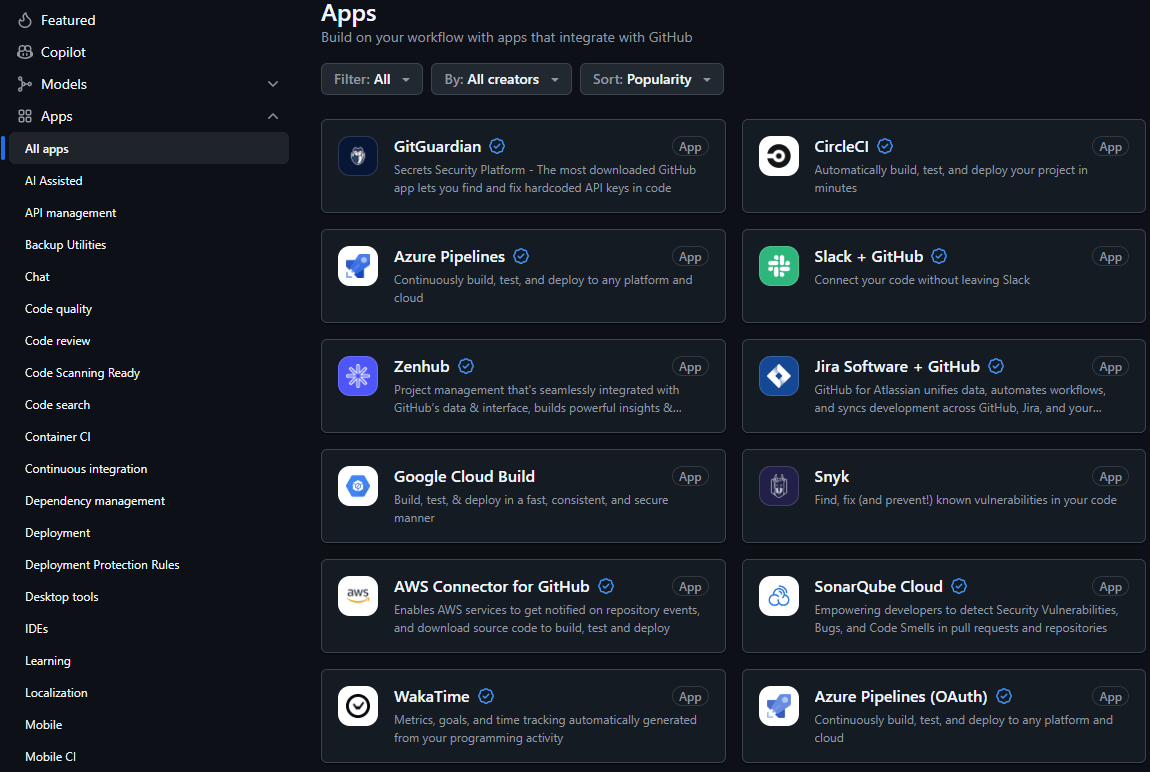
GitLab combines built-in features with integration capabilities:
- Core DevOps features are built-in and maintained by GitLab
- Over 40 external integrations available for tools like Slack, Jira, and Datadog
- Native API for custom connections
- Consistent authentication across all features
- Working toward a unified data model for simplified reporting

Kobee focuses on depth over breadth. Rather than trying to integrate with every possible tool, it provides deep, native integration with the tools enterprises actually use:
- Version control: Git, GitHub, Subversion, Microsoft TFVC, Azure DevOps,...
- Issue tracking: Jira, Microsoft TFS, Azure DevOps, MicroFocus ALM
- Mainframe systems: Native support for mainframe environments and IBM tooling
- Security: LDAP, Active Directory integration
The key difference? These aren't surface-level integrations. Kobee understands mainframe workflows and enterprise requirements, providing integrations that actually work in complex environments.

Security and compliance capabilities for regulated industries
For regulated industries (finance, healthcare, government), security and compliance aren't optional, they're mandatory. Each platform approaches this differently.
GitHub Advanced Security (additional cost) provides:
- Code scanning with CodeQL
- Secret scanning and push protection
- Dependency vulnerability alerts
- Compliance with SOC 2, ISO 27001
- SAML SSO (part of GitHub Enterprise, not Advanced Security)
It's comprehensive but requires configuration and often additional tools for full compliance workflows.
GitLab builds security into the platform:
- SAST (free tier), DAST and dependency scanning (Ultimate tier)
- Container scanning (free tier), license scanning (Ultimate tier)
- Compliance frameworks and audit events
- Security dashboards and vulnerability management
- Approval rules and separation of duties
The advantage is having security data in the same system as your code and deployments.

Kobee approaches security from an enterprise governance perspective:
- Role-based access control integrated with enterprise directories
- Comprehensive logging of build and deploy actions
- Approval workflows and notifications
- Support for compliance standards: CMM, ITIL, Sarbanes-Oxley
- Secure mainframe integration maintaining existing controls
For organizations where a failed audit means massive fines, Kobee's enterprise-first approach to security and compliance provides confidence that consumer-grade tools struggle to match.


The real cost at enterprise scale
Understanding true costs at enterprise scale requires looking beyond list prices.
GitHub offers generous free tiers:
- Unlimited public repositories
- 2,000 CI/CD minutes/month
- Basic features for small teams
But enterprise costs add up:
- GitHub Enterprise Cloud: $21/user/month
- Advanced Security: $49/committer/month additional
- Actions minutes: Overage charges accumulate
- Large file storage: Extra fees
- Codespaces: Compute and storage costs

GitLab follows a similar pattern:
- Free tier with 400 compute minutes per month
- Premium: $29/user/month
- Additional storage: $5/10GB
- Additional compute: $10/1,000 minutes
The "single application" approach provides value but comes with vendor lock-in considerations.

Kobee's Enterprise license at €99.95/user/month (€25,000 annual minimum) seems expensive until you consider the mainframe context:
- Replaces multiple legacy tools costing millions
- Includes all mainframe features with no hidden fees
- Reduces operational costs through automation
- Implementation includes consultation services
- ROI often measured in months, not years

One customer saved two-thirds on software maintenance costs. When you're dealing with mainframe environments where legacy tools can cost millions in licenses and expertise, Kobee's transparent pricing can deliver significant value.
Support models reflect target markets
The support experience reveals who each platform really serves.
GitHub offers tiered support:
- Community forums for free users
- Email support for paid plans
- Priority support with 30-minute SLA for Enterprise
- Extensive documentation and learning paths
- Large community ecosystem
It works well if you have internal expertise or can leverage community resources.
GitLab provides structured support:
- Priority support for all paid tiers
- 30-minute emergency response SLA for Premium/Ultimate
- Dedicated customer success for large accounts
- Comprehensive documentation
- Professional services available
The focus is on helping organizations succeed with the platform.
Kobee takes a consultative approach:
- Implementation delivered through consultation services
- Three-step process: Discovery, Pilot, Implementation
- Partner-delivered professional services
- Full Technical support
- Focus on collaborative implementation
This high-touch model reflects the complexity of enterprise transformations. You're not just buying software, you're transforming how your organization develops applications.
GitHub vs GitLab vs Kobee: Which should you choose?
The choice depends on your organization's specific needs, existing systems, and transformation goals.
Choose GitHub if:
- Developer collaboration and community are top priorities
- You want best-in-class tools you can mix and match
- AI-powered development assistance would provide significant value
- Your team already lives in the GitHub ecosystem
- You have the expertise to integrate and maintain multiple tools
- Mainframe systems are a small part of your technology stack
Join the world's largest developer community on GitHub
Choose GitLab if:
- You want everything in a single, integrated platform
- Reducing tool sprawl is a key objective
- Built-in security and compliance features are important
- You prefer predictable, unified workflows
- Your team needs comprehensive DevOps beyond just CI/CD
- You're willing to trade some flexibility for simplicity
Simplify your DevOps with GitLab's single application
Choose Kobee if:
- You have extensive mainframe systems requiring modern CI/CD
- Out-of-the-box functionality and configuration flexibility are important
- Your team lacks deep DevOps scripting expertise
- Regulatory compliance and governance are critical
- You need to bridge mainframe and distributed development
- Reducing mainframe operational costs is a priority
Transform your mainframe CI/CD with Kobee's enterprise platform. Get Started Today!
The reality is that these platforms serve overlapping but distinct needs. GitHub and GitLab compete broadly for modern application development, while both now offer mainframe capabilities. Kobee provides a specialized alternative for organizations that need purpose-built mainframe CI/CD with minimal configuration and maximum enterprise control.
For enterprises with significant mainframe investments, the question isn't necessarily either/or. Many organizations use GitHub or GitLab for distributed development while leveraging specialized tools like Kobee for their mainframe environments. The key is choosing the right tool for each part of your technology landscape.
In an ideal world, enterprises wouldn't have to choose. But in the real world of budgets and complexity, picking the right platform for your specific needs can mean the difference between transformation success and expensive failure. Choose wisely.
Struggling with GitHub or GitLab complexity?
Managing integrations, scripts, and compliance across GitHub or GitLab slows teams down. Kobee unifies CI/CD with enterprise features — streamlined and ready to scale.
About the author
Hello, my name is René De Vleeschauwer.
Throughout my career, I have been actively engaged in developing enterprise software. For the past 18 years, I have led the development of Kobee, an open CI/CD and DevOps framework that has been highly regarded in regulated enterprises.
Do you have any questions? Just ask me!